Selecting for mutations may introduce bias — mutations are often enriched in specific cancer types.
2. Input Genes
Design mode: Enter < 20 genes for best results
Stats auto-loaded when you click Run
Accepts CSV, TSV, or TXT
3. Results
101640
101418222630343840
102560
102030405060
1310
12345678910
Double-click node for Gene Effect, edge for Correlation
Selected:
Removed:
New to Correlate?
Click Test Genes and then Run ▶
(both in "2. Input Genes")
Next, double-click nodes and edges in the generated network for more functions. Decrease correlation cutoff and press Run again to identify interactions of weaker strength.
Correlation:
Positive
Negative
Edge Thickness:
r=0.5
r=0.7
r=1.0
Node color:
Node Type:
Input gene
Correlated gene
* = synonym/orthologue used
Tip: Click Correlate to view a scatter plot, or By Tissue for tissue breakdown. Ctrl/Cmd+click a column header to copy that column. Use Filters to set numeric cutoffs on columns.
Mean (All) = all cells, Mean (Filt) = filtered cells. * indicates genes from your input list (Design mode). All input genes are shown; "Corr" column indicates if correlations were found.
Note: Differential gene effects may reflect selection bias (e.g., mutations enriched in certain cancer types) rather than direct functional consequences of the mutation. Consider filtering by lineage to control for tissue-specific effects.
Statistics: p-values are calculated using Welch's t-test comparing gene effect scores between wild-type (WT, 0 mutations) and mutated cells (1+2 or 2 mutations). Δ GE = Mean(mutated) − Mean(WT).
Low Risk: Exact synonyms from HGNC. Mid Risk: Less certain synonyms. Orthologs: Mouse-to-human gene mappings.
Input Gene
Status
Official Symbol
Low Risk Synonyms
Mid Risk Synonyms
Orthologs (Mouse→Human)
Select "Synonym/Ortholog Lookup" mode and click Run
Run analysis to view summary
Correlation: Gene1 vs Gene2
Genes (X/Y)
Plot Size
×px
Axis Ranges
Tissue Filter
Hotspot Filter
Fusion Filter
Compare
Highlight Cell Lines
Font
Hotspot Overlay
⚠️ Mutations may be enriched in specific cancer types.
Fusion Overlay
Gene Effect Analysis
⚠Min n:View:
Gene:-
Mean GE:-
SD:-
Cell lines:-
1.0
1.0
⚠️ Caution: Hotspot mutations are often enriched in specific cancer types. Observed differences in gene effect may reflect cancer type rather than the mutation itself.
Statistics (click row to focus)
p-values: Welch's t-test comparing each cancer type vs all other cell lines.
Group
N
Mean GE
SD
Export Chart:Export CSV:
How Correlate Works
Discovering functional gene relationships from CRISPR screen data
What is Correlate?
Correlate analyses gene effect scores (CRISPR knockout fitness) across 1,100+ cancer cell lines from the DepMap project.
Genes whose knockout produces correlated fitness effects across cell lines are likely to share functional relationships — shared pathways, protein complexes, or regulatory dependencies.
Understanding Gene–Gene Correlation
Each gene pair is compared by their gene effect scores across all cell lines. The Pearson correlation (r) measures how similarly two gene knockouts affect cell fitness:
↗
Positive (r > 0)
Knockout of both genes affects the same cell lines in the same way — suggesting shared pathway or complex membership.
⟷
No correlation (r ≈ 0)
Gene knockouts have unrelated fitness effects across cell lines.
↘
Negative (r < 0)
Gene knockouts have opposite effects across cell lines — when one is essential, the other is dispensable, suggesting compensatory or antagonistic roles.
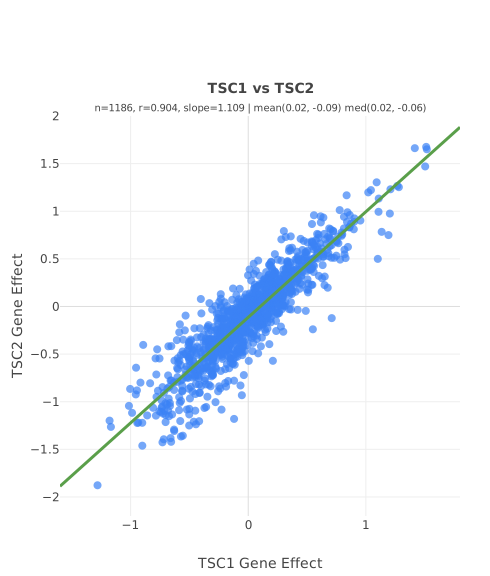
Example: TSC1 vs TSC2 gene effect across 1,186 cell lines (r = 0.90). Knockout of either gene produces nearly identical fitness effects, yet the impact is highly context-dependent — some cell lines thrive while others are depleted.
The strong correlation reveals that TSC1 and TSC2 function as an obligate complex — without prior knowledge of the pathway. This is the power of unbiased correlation analysis: it discovers functional relationships directly from the data.
Pathway adapted from Huang & Manning, Cell Res (2008) 18:62–69
The Correlation Network
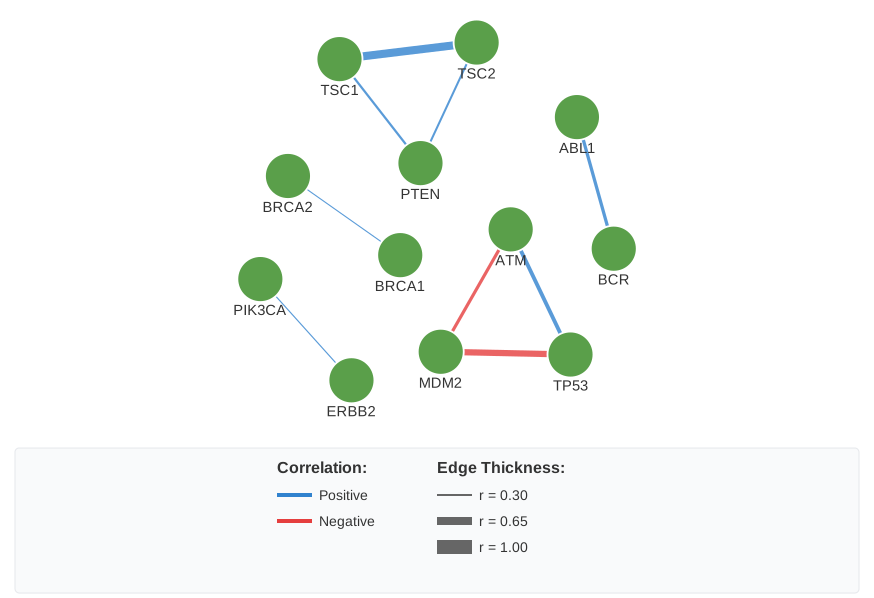
All pairwise correlations between your genes are combined into an interactive network graph. Each node is a gene; edges connect correlated pairs. Edge color and thickness encode the correlation:
Example network: Genes cluster by functional relationships. TSC1–TSC2 (thick blue edge) share a complex; TP53–MDM2 (red edge) show opposing fitness effects.
Double-click a node to see its gene effect profile, or an edge to view the scatter plot.
From Screen Data to Hypotheses
Correlate is designed for two complementary purposes: analysing screen data (e.g. CRISPR hits, gene lists) and generating new hypotheses using its built-in tools:
🔍 Design Mode
Enter seed genes and discover what correlates with them. Expand beyond your input list to find unexpected functional partners.
🧬 Mutation Analysis
Compare gene effect in cells with specific hotspot mutations or translocations vs wild-type. Identify genes with differential dependency in mutant backgrounds.
📊 Cell Line Browser
Explore individual cell lines — filter by tissue, mutation, or gene effect. View top dependencies and select cell line subsets for focused analyses.
🧪 Enrichr Integration
Send any gene list to Enrichr for pathway enrichment analysis. Available from correlations, clusters, mutation results, and cell line views.
Quick start: Click Test Genes, then Run ▶ to see an example analysis.
Lower the correlation cutoff and re-run to reveal weaker interactions.